Rated 4.9★ · Free on Chrome Web Store

The Screen Capture Chrome Extension That Does More Than Screenshots

NAScreenshot is a free screen capture for Chrome extension that goes beyond basic snipping. Capture full scrolling pages, crop selections, annotate with precision, and extract any text from images using Google Gemini AI OCR — all stored privately on your device.

4.9★ Chrome Store Rating
30+ OCR Languages
100% Free & Private

Everything a Chrome Screenshot Extension Should Do

Most screenshot tools just save an image. NAScreenshot captures, annotates, OCR scans, translates, and stores your work — privately, locally, and for free.

4 Capture Modes in One Extension

Capture the visible tab, drag-select a region, auto-scroll a full page, or set a countdown timer — all from a single screen capture for Chrome extension. No more juggling multiple tools.

Professional Annotation Editor

Add arrows, shapes, text callouts, and numbered steps. Blur sensitive data like passwords or personal info before sharing. Built for developers, designers, and support teams.

Gemini AI OCR — Extract Any Text

Stop retyping text from screenshots, PDFs, or foreign-language pages. NAScreenshot's Gemini-powered OCR reads any image and returns clean, copyable text in under a second.

Instant 30+ Language Translation

Screenshot a page in Japanese, Korean, Arabic, or any of 30+ supported languages and translate the extracted text instantly — ideal for researchers, students, and global teams.

Searchable Local Capture History

Every screenshot and OCR result is saved locally in your browser's IndexedDB. Browse, search, re-copy, or delete your history anytime — no account, no sync, no cloud dependency.

Zero Cloud — 100% Private by Design

NAScreenshot never sends your screenshots or API keys to external servers. Everything stays on your local device. No tracking, no spyware, no subscriptions — just a fast, private screenshot tool.

See NAScreenshot in Action

Real screenshots from the annotation canvas and Gemini AI OCR extraction panel.
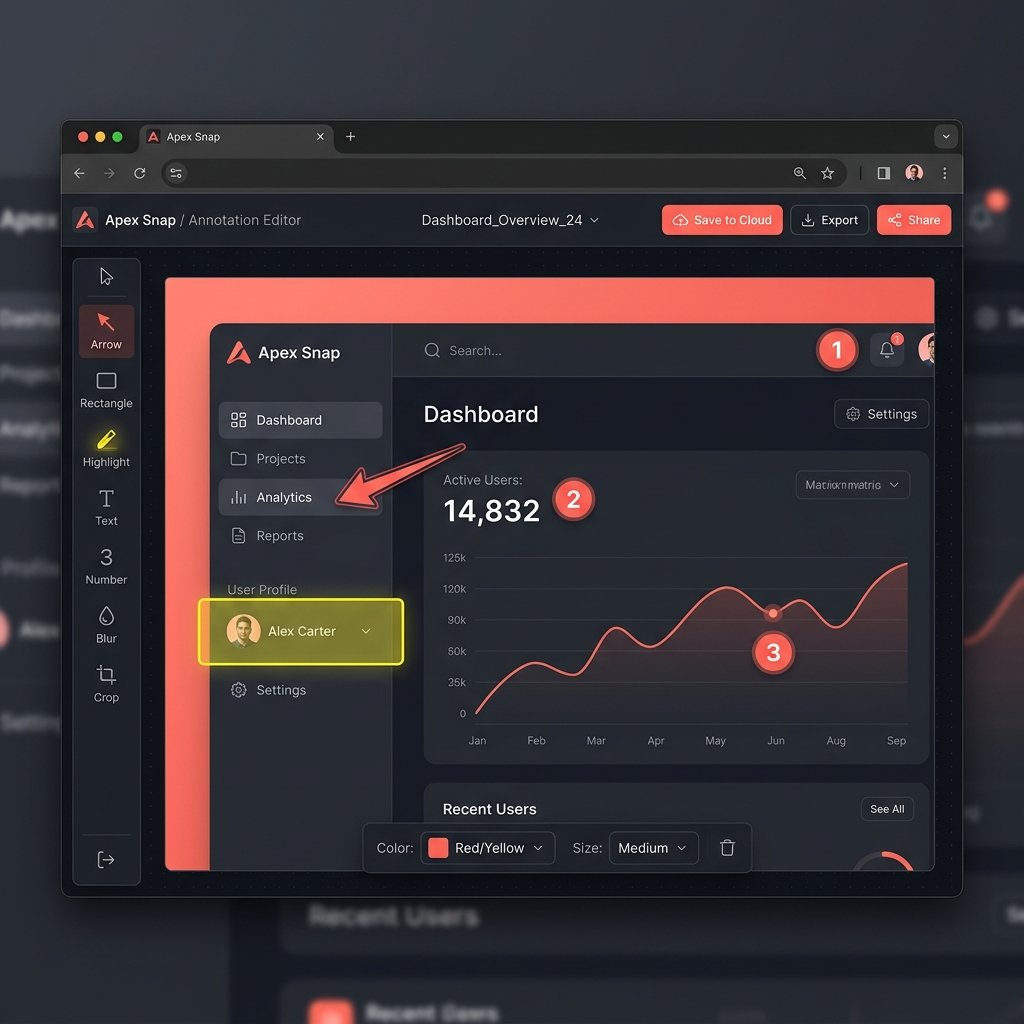
Screen Capture for Chrome Extension, NAScreenshot annotation editor — Chrome screenshot extension with arrows, blur, and step numbers

Annotation Canvas Editor

Draw arrows, add step labels, highlight regions, and blur sensitive data directly on your screenshot — no external editor needed.
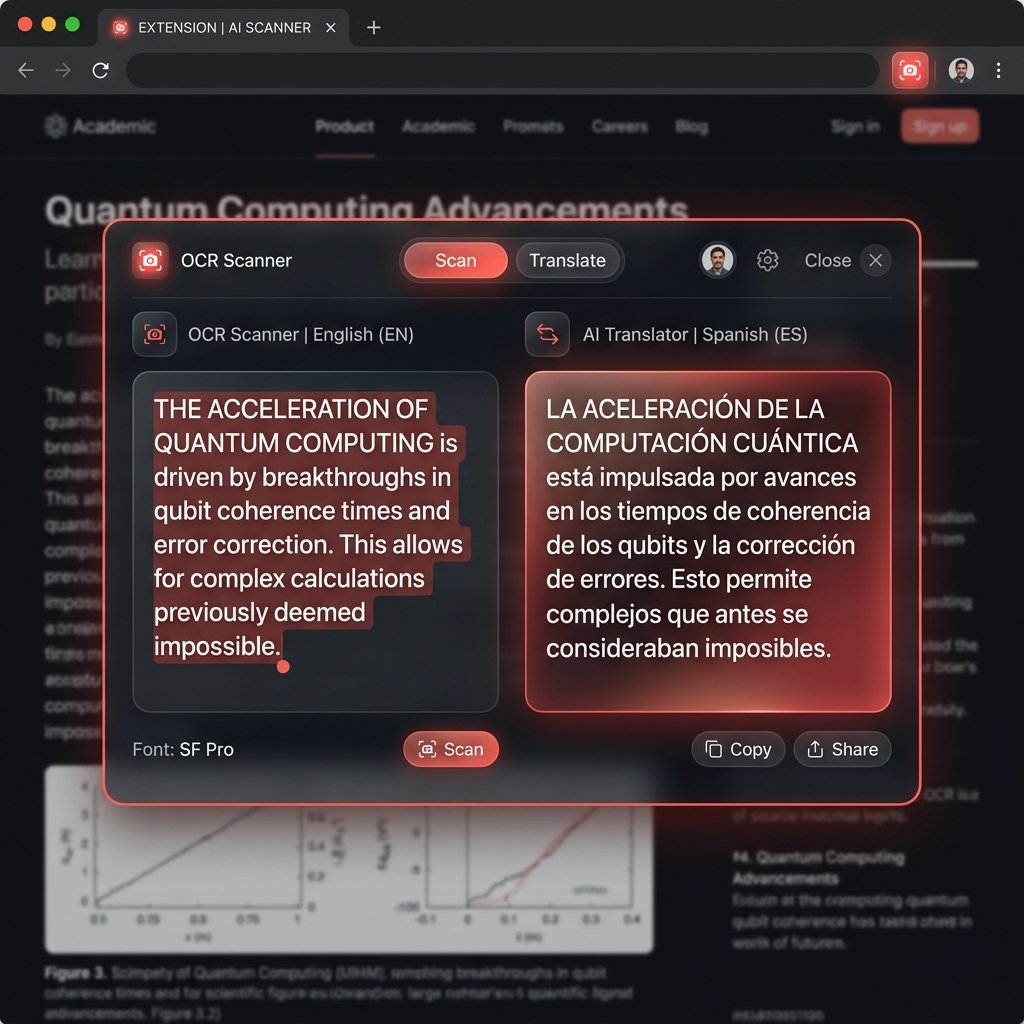
NAScreenshot Gemini AI OCR panel — extract and translate text from full-page screenshots

Gemini AI OCR & Translation Panel

Select any region of your screen capture and extract all text with high-accuracy Gemini OCR. Translate to 30+ languages in one click.

How NAScreenshot Works

Explore the four core panels that make this the most complete screen capture Chrome extension available — free.

Flexible Screen Capture — 4 Modes

Launch from the extension popup or use keyboard shortcuts for instant capture. Whether you need a quick tab snapshot or a full-page scroll, NAScreenshot handles it in one click.

  • Visible Area: Capture exactly what's on screen right now (Ctrl+Shift+S).
  • Selected Region: Drag to crop any area with pixel precision.
  • Full Page Scroll: Auto-scrolls and stitches the entire webpage — like GoFullPage, but better.
  • Delayed Capture: Set a timer to screenshot hover states, tooltips, or dropdown menus.

Annotation Editor — Mark Up Screenshots Instantly

Stop switching to Figma or Paint just to add an arrow. NAScreenshot's built-in editor lets you annotate any screenshot without leaving Chrome.

  • Arrows & Shapes: Lines, rectangles, ellipses for clear visual guidance.
  • Step Numbers: Add numbered badges to walk users through processes step-by-step.
  • Blur & Mask: Hide passwords, emails, personal info, or financial data before sharing.
  • Text Overlays: Add callout labels directly on the image canvas.

AI OCR — Extract Text from Any Screenshot

Use your own Gemini or OpenRouter API key to run high-accuracy OCR on any screenshot selection. Your key is stored locally in your browser — never sent to NAScreenshot servers.

  • Gemini 1.5 & 2.0 Flash: Industry-leading accuracy, sub-second extraction.
  • Works on any image: PDFs, photos, website text, charts, receipts, handwriting.
  • 30+ Languages: Extract and translate in one workflow.
  • One-click copy: Paste extracted text anywhere instantly.

NAScreenshot vs GoFullPage vs Awesome Screenshot

See how NAScreenshot stacks up against the two most popular screen capture Chrome extensions — feature by feature, with no paid upsells.

Feature
NAScreenshot Free
GoFullPage Freemium
Awesome Screenshot $6/mo
Full page scrolling capture
Region / crop selection
Annotation editor (arrows, blur, steps)
Paid only
Basic on free
AI OCR text extraction
30+ language translation
Local private history (no cloud)
Cloud only
100% free — no subscription
Freemium
$6/mo paid tier
Delayed timer capture
Screen video recording
Paid HD only
Zero data sent to servers
Partial
Cloud upload
Get NAScreenshot Free — No Sign-up Needed

The only screen capture Chrome extension with AI OCR, full privacy, and zero paywalls.

Up and Running in Under 60 Seconds

Installing and using a screen capture Chrome extension has never been this fast.

Install from Chrome Web Store

Search for NAScreenshot in the Chrome Web Store, click "Add to Chrome," and the extension is ready in your toolbar within seconds. Works on Chrome, Edge, Brave, Arc, and Opera.

Click, Capture, Annotate

Click the NAScreenshot icon or press your keyboard shortcut to capture your screen. Choose your mode, crop if needed, and open the annotation editor to mark it up instantly.

Extract Text or Save Locally

Run AI OCR to pull text from any screenshot with Gemini. Translate to your language, copy the output, or save everything privately to your local history — no sign-up required.

Frequently Asked Questions

Everything you need to know about the best free screen capture Chrome extension.

NAScreenshot is one of the most feature-complete free Chrome screenshot tools available. It combines full-page scrolling capture, region selection, a professional annotation editor, Gemini AI OCR, 30+ language translation, and local private history — all at zero cost, with no subscription required.

Yes. NAScreenshot does everything the GoFullPage Chrome extension does — full-page scrolling capture included — and adds features GoFullPage doesn't offer: crop selection mode, annotation tools, AI OCR text extraction, translation, and a private local history. And unlike GoFullPage's freemium model, all NAScreenshot features are completely free.

To use this screen capture for Chrome extension: (1) Install NAScreenshot free from the Chrome Web Store. (2) Click the icon in your browser toolbar. (3) Select a capture mode — Visible Area, Selected Region, Full Page Scroll, or Delayed. (4) Annotate, run AI OCR, or save to your local history.

Both tools offer full-page scrolling capture, region selection, and annotation editors. The main differences: NAScreenshot is completely free with no paid upgrade path, stores all your screenshots and history locally (no cloud uploads), and uniquely includes Gemini AI OCR for extracting text from images in 30+ languages. Awesome Screenshot uses a freemium model starting at $6/month for advanced features, relies on cloud storage, and doesn't include AI OCR. For users who care about privacy and AI-powered text extraction, NAScreenshot is the stronger choice.

Yes — 100% free, with no hidden tiers or paid upgrades. Full-page capture, annotation editor, AI OCR, local history, and all other features are available without paying anything or creating an account.

Completely private. NAScreenshot has no cloud servers for storing screenshots or text. All captures, OCR results, translation history, and your API key are stored exclusively on your local device using Chrome storage and IndexedDB. Nothing ever leaves your browser.

NAScreenshot follows Manifest V3 standards and works on all Chromium-based browsers: Google Chrome, Microsoft Edge, Brave, Opera, Arc, and other Chromium browsers. Install it once from the Chrome Web Store and use it everywhere.

The Last Chrome Screenshot Tool You'll Ever Need

Join thousands of developers, researchers, writers, and students who use NAScreenshot to capture, annotate, and extract information from the web — instantly and privately.

Add to Chrome — It's Free

No account needed · No credit card · Works on Chrome, Edge & Brave